
Complete Guide to Protect Your Website from Hackers
WordPress is the most popular content management system in the world. Because of this popularity, it is often targeted by hackers. Therefore, WordPress security is extremely important for every website owner.
In this guide, you will learn what WordPress security is, why it matters, and how to protect your site using simple and effective methods.
Why WordPress Security Is Important
A secure WordPress website protects both your data and your visitors. Without proper security, your site may face serious problems.
For example, a hacked website can cause:
- Data theft
- Website downtime
- Google blacklisting
- Loss of SEO rankings
- Loss of user trust
As a result, even small blogs and business websites should take security seriously.
👉 You can also improve site performance by following our guide on
WordPress Speed Optimization
Common WordPress Security Threats
Understanding common threats helps you prevent attacks more easily.
1. Brute Force Attacks
Hackers try thousands of username and password combinations. Therefore, weak passwords are very dangerous.
2. Malware Infections
Malware often enters through outdated plugins or nulled themes. As a result, your website may redirect users or show spam.
3. Outdated Plugins and Themes
Old software versions contain known security flaws. Because of this, updates are critical.
4. SQL Injection and XSS Attacks
These attacks target your database and forms. However, proper validation and security plugins can stop them.
Best Practices for WordPress Security
Use Strong Login Credentials
First of all, avoid using “admin” as your username. Instead, use a unique username and a strong password. Additionally, enable Two-Factor Authentication (2FA).
Keep WordPress Updated
Always update:
- WordPress core
- Themes
- Plugins
Updates fix security issues and improve performance.
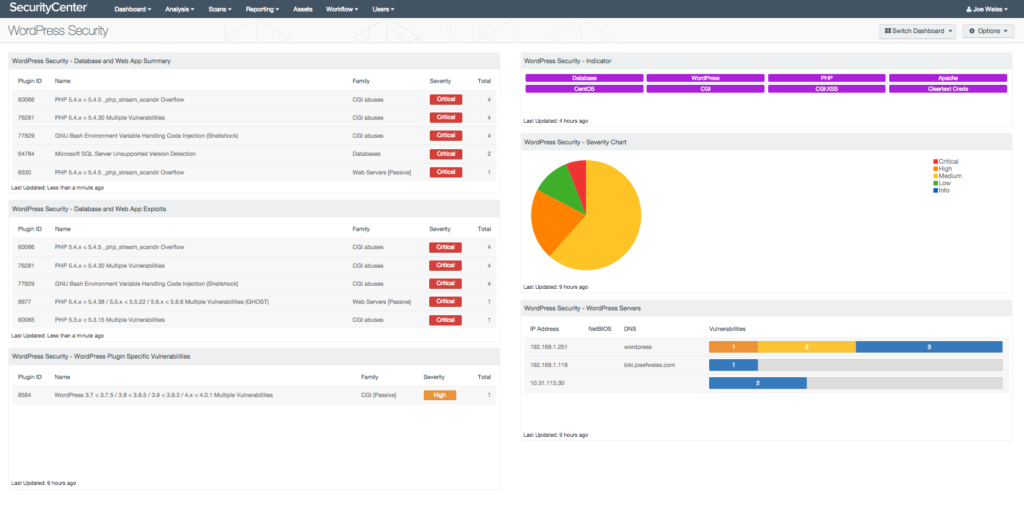
Install a WordPress Security Plugin
Security plugins add an extra layer of protection. Popular options include:
- Wordfence
- iThemes Security
- Sucuri
You can also read the official WordPress security guide here:
https://wordpress.org/documentation/article/hardening-wordpress/
Advanced WordPress Security Tips
Moreover, you can strengthen security by:
- Limiting login attempts
- Changing the default login URL
- Disabling file editing in
wp-config.php - Scheduling automatic backups
For backup strategies, check our article on
How to Backup a WordPress Website
How WordPress Security Helps SEO
Google prefers safe websites. Therefore, a secure WordPress site:
- Avoids malware warnings
- Loads faster
- Keeps bounce rate low
- Builds trust with users
In other words, better security leads to better SEO rankings.
Final Thoughts
WordPress security is not a one-time setup. Instead, it is an ongoing process. By using security plugins, keeping everything updated, and following best practices, you can protect your website from most threats.
If you care about your website’s growth, SEO, and credibility, investing in WordPress security is essential.